


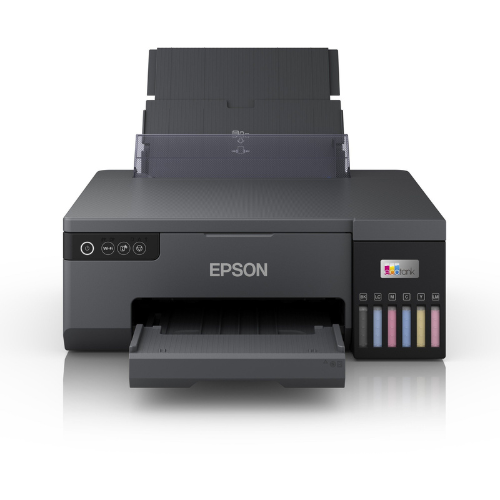


Experience exceptional printing performance with the Epson EcoTank L8050, designed for high-quality, cost-efficient photo and document printing. With its 6-color ink tank system, wireless connectivity, and borderless A4 printing, this printer is perfect for professionals, students, and businesses that value vibrant results and low running costs.Whether for photo studios, home offices, or creative projects, the L8050 delivers outstanding detail, brilliant color reproduction, and the convenience of cartridge-free printing
Specifications Table
| Feature | Details |
|---|---|
| Brand | Epson |
| Model | EcoTank L8050 |
| Printing Technology | Inkjet, 6-Color Refillable Ink Tank System |
| Max Print Resolution | 5760 x 1440 dpi |
| Print Speed (4R Photo) | Approx. 25 seconds |
| Paper Size | Up to A4, Borderless Printing |
| Connectivity | USB, Wi-Fi, Wi-Fi Direct |
| Supported OS | Windows, macOS, iOS, Android |
| Ink Type | Epson Claria ET Premium Inks |
| Power Consumption | Approx. 17W (printing) |
| Dimensions | 403 x 369 x 141 mm |
| Weight | Approx. 6 kg |
| Warranty | 1 Year / 30,000 Prints (whichever comes first) |
Frequently Asked Questions (FAQs)
Q1: What type of printing is the Epson L8050 best suited for?
A1: It’s ideal for high-quality photo printing, creative projects, and office documents.
Q2: Can the Epson L8050 print wirelessly from a phone?
A2: Yes, it supports Wi-Fi and Wi-Fi Direct for wireless printing via the Epson Smart Panel app.
Q3: Does the L8050 support borderless photo printing?
A3: Absolutely! You can print borderless photos up to A4 size.
Q4: How efficient is the ink usage?
A4: The EcoTank refillable ink system provides high page yields and significantly lower cost per print.
Q5: Can I use it for professional photo printing?
A5: Yes, with its 6-color Claria ET Premium inks, it delivers stunning, true-to-life photo results suitable for professional use.






 No products in the cart.
Reviews
There are no reviews yet.