
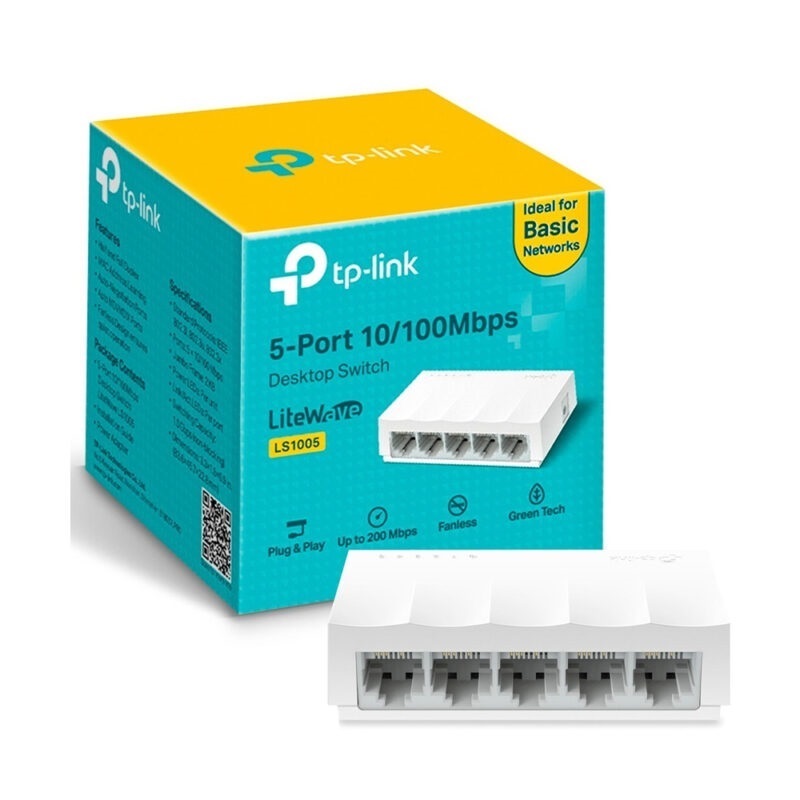



TP Link LS1005 5 Port Desktop Switch delivers reliable, wired networking with a compact and durable metal design. Featuring five 10/100 Mbps RJ45 ports with Auto‑MDI/MDIX, the switch automatically adjusts cable types—no crossover cables needed.
Designed for simplicity, the LS1005 requires no configuration—just plug in Ethernet cables and power it on. It supports QoS (Quality of Service) to ensure smooth performance for video calls and multimedia streaming.
Encased in a fanless metal housing, this switch operates silently and withstands daily use. It’s an excellent choice for extending your wired network to computers, printers, smart hubs, or IP cameras in homes and small offices.
With dependable performance and zero setup hassle, the TP Link LS1005 5 Port Desktop Switch is an affordable and practical solution—available now at Future IT.
✅ Specifications
| Specification | Details |
|---|---|
| Model | TP Link LS1005 |
| Ports | 5 × 10/100 Mbps RJ45, Auto‑MDI/MDIX |
| QoS Support | Yes (802.1p) |
| Switching Capacity | 1 Gbps |
| Forwarding Rate | 0.74 Mpps |
| Housing | Metal chassis, fanless design |
| Power Supply | External 5 V ⎓ 0.6 A adapter |
| LED Indicators | Power, per‑port Link/Activity |
| Dimensions | 120 × 78 × 23 mm |
| Weight | Approx. 200 g |
✅ FAQs
Q1: Do I need to set up the LS1005?
No setup is needed—it’s plug-and-play.
Q2: How many devices can I connect to it?
You can connect five wired devices like PCs or printers.
Q3: Does it make noise?
No. It uses a fanless metal design, so it runs silently.
Q4: Can it support voice or video calls?
Yes, with QoS, it prioritizes multimedia traffic for smoother performance.
Q5: Is it suitable for home offices?
Absolutely. Its compact, durable design is ideal for desktops in home or small office settings.








 No products in the cart.
Reviews
There are no reviews yet.